00:00:00
The computer you see on my desk is the one that I use when I'm making content, editing video, and for a lot of other things. But it's not the computer I do most of my work on. Hell, I'm not even recording on this right now. I'm technically using a Windows PC in the corner to film. But I've historically done most of my dev work on this MacBook. The same one that you guys see is the one I use for my day-to-day stuff. Well, it was, but that's changed a bit. I need to explain why. But first, I want to show you guys something. These are the computers I do my actual work on. Yeah, probably not what you thought. and I need to justify the amount of money I wasted. So, we're going to do that with a quick break for today's sponsor. You might have noticed that I haven't been talking about Versel as much recently. That's because I've been using a different cloud for a lot of what I'm building. It turns out that serverless isn't the right solution for a ton of different things. And since I started building on Railway, I've had way more fun trying things that I never would have before. You might have seen hints in other videos that I've been building my own cloud. Believe it or not, it's currently hosted entirely on Railway. It's trivial to set up multiple different real services with real databases, real storage, and more. They provide all the things you need in this awesome canvas view for working on it. But I got another fun thing to tell you. I didn't set this up in the canvas myself because Railway has a CLI, MCP, and more in order to make your agents capable of doing all of these things, too. When you set up the CLI, there's an option for agents that will go set up their skills as well, which give your agent everything it needs to actually make changes on Railway, and it's been super stable for me in all of my testing. They also make it trivial to spin up additional environments, whether for things like pull requests or just having a staging environment before you actually deploy things out to your real production instances. It's literally one click in the UI. I needed staging for Lake Bed, so I just did it now and it was literally two clicks. That's incredible. I will be honest though, I was worried about pricing cuz spinning up all these different environments across all these different things is kind of expensive with servers. But they do things differently at Railway. They only charge you for what you're actually using. So, my service has spikes up to as high as 12 vCPUs, but it usually idles in the 0.1 to 0.2 range, which means that's what I could build for instead. So, you pay for what you use, you spin up what you need, and your agents can do it, too. What are you waiting for? Check them out now at soyv.link/railway. While I wait for all of those machines to boot again, I want to talk a bit about why I made this change. It might seem a bit crazy as somebody who's always been a bit of an Apple fanboy, at least as long as I've been making content for. Why do I make the shift now? Why didn't I do it at the start of the year when I first started talking more about Linux, I started playing with these other machines and getting excited about things like Neri and Cachios? Why now? I had a lot of different reasons, but this one was the biggest. When I use codecs on my Macs, even on my remote Mac Mini, it just kind of hammers my machine. There's layers to this, and I'll talk about a lot of them throughout, but it was getting to the point of like unusable. And when you combine this with this problem, which we've all seen enough times now, the person leaving their MacBook slightly open because it's running agents on it, I knew it was wrong, but it started to feel even more wrong as of late. In particular, because I've been running agents to do more of the endto-end work, not just making one small change, but making the whole change, waiting for the PR to be ready, get reviewed, and then addressing the feedback. Those types of longer running work became more and more of what I was doing. and doing it on my MacBook was driving me insane.
00:03:14
Especially when I have to like go do other things because as much as I'm clearly too online, I do also have to go to a lot of events and meetings and things in the city. And having my MacBook stuck running work when I had to run off and go do something was obnoxious. This photo isn't me. This is the one that always goes viral. My left thumb doesn't work that well after the surgery. My right hand could do that, but this one wouldn't have a good time with that. I found myself doing things like this and not liking that at all. I also found myself often in like bad internet situations where my 5G was not working great when I was in an Uber trying to get some changes out and having that all running on my computer was obnoxious. So, I started to play with cloud options and there are some very compelling ones nowadays. I really do believe that things like Devon's cloud implementation as well as cursors are genuinely usable for the majority of day-to-day work and I like them a lot. But there are catches. The biggest one, and this is so stupid, is the subsidization levels. Both Claude Code and Codeex massively subsidize your token utilization. Oh, my browser froze. Great. I'm beachballing. Literally, as I'm filming the video about Linux and why I don't like using Mac OS anymore, I'm [ __ ] beachballing. Are you kidding? Are you [ __ ] kidding? I'm going to blame Firefox, but it's still annoying as hell. According to the most recent research by semi analysis testing out how far they could push the Claude Pro Max and Max 20x planes as well as the Chatbt equivalents, the $20 plan gets you $400 a month of inference. The $100 plan gets you 2,000 a month. And the $200 plan gets you 8 grand on Claude. And on Codeex, the $200 plan is 700 a month. $100 plan is 3500 a month.
00:04:50
And the 200 is 14,000 a month. So, if you are going to use one of the cloud IDE options like Devon or Cursor, as much as I love both, if you're able to use these subs, those don't feel like good deals anymore. If you're an enterprise and you can't use these subscription plans anyways, you should probably just go use those. But to the handful of us that are building on personal projects using these types of workflows that want to be able to close their laptop but also take advantage of the insane like value you can get for these plans. I think this video is going to be really useful because I'm not running these plans on my Mac almost ever anymore. So what am I doing instead? I've had all these machines with tail scale and it's been pretty damn awesome. I use them a lot over SSH but I also use them a lot over T3 code. I want to focus on the SSH side first because I think it's really good. So, here I have in CMU, which is the wrapper for Ghosty that I really like cuz you can have a sidebar and pin things and notifications and whatnot. I have all of my machines that I access regularly pinned on the side here at the top. I have my desk mini. This is my main Mac Mini. I have a different one that's an OpenClaw instance. I'm mostly letting my team use that. I'm not using as much right now. I have BB1, which is a blackbox one. That's just my temporary name for my new framework that I just plugged back in. I have the Zbook. This is my HP that I, as I mentioned before, did most of my work on. Then I have a Comfy UI rig. I forgot what this one is, but yeah, I mostly use these two right now. And there's a lot of little things I did to my setup that have made it really pleasant. The first is that when I SSH in, it instantly opens up T-M. So if I have anything going on in here, like let's say I have BTOP open and I disconnect, I SSH back in, it's still open exactly where it was. This alone has made this so much nicer. You also can't see a lot of the numbers there cuz I have such a small resolution when I'm streaming. I got 32 threads on this machine. I also have 32 threads on that Zbook as I mentioned before. And right now they're not doing much cuz I did just take down them down and cancel all the work they were doing. But man, these machines do a lot of work for me. Like absurd amounts. I'll talk more about the work I did on them in the future, but for now I want to focus on the workflow and how I actually use these machines.
00:07:03
First and foremost, when I'm just doing traditional like [ __ ] around work, exploring things, playing with the OS, trying to get my network in the setup the way I want it, I'll just hop in, open up codecs in the terminal, and do my stuff from here. And it's been pretty dang solid. I'm not going to lie. I'm on an alpha build because I noticed some issues with the websocket server connections on Linux. they have since fixed them. So, I could get off the alpha now. I'm just lazy. Whenever I'm trying to work on the machine itself, like I'm doing anything specific to this computer, I tend to do it this way. Or if I'm using features that are specific to the harnesses, like I really want to play around with ultra code and workflows and cloud code, or I want to use things like uh goals and sub agents and actually see what they're doing. Turns out codec CLI gives you almost no visibility there anyways other than how long the goal's been running for. But for that type of stuff where I'm really pushing the limits of the harnesses and testing them, I have found using them in the terminal to be tolerable. There are some very big real catches here though that have been driving me mad. One is pictures. There are hacks that can make this work, but I'm a person who does a lot of screenshotting and pasting screenshots to their agent. I get errors when I do that over SSH because you can't paste an image over SSH. Even doing it in the normal terminal was already a hack. So, there are catches to put it lightly here. Also, when I'm not on my home network, I have to connect to a different address because I can't use the local addresses. I told Codeex to figure that all out and it was mostly able. One thing I would highly recommend if you're going to do a setup like this is to pick the machine that is the brains of the operation. For me, it's this MacBook. This MacBook has access to all the other computers. It has SSH IDs already copied and keys so that it can SSH without a password, which means that my agent can as well. I also gave it a skill that tells it all about the fleet, all the different computers I have on the network and what they are, where they are, and how they're configured, as well as a set of the default configs that I like to use for this type of stuff. So, I'm going to do a thing that I want to do for a while. I noticed that I have a much better like pure style prompt on my Macs than I do on the PCs.
00:09:09
These ones, the Linux boxes in particular, just have a pretty boring bog standard prompt. So, I'm going to fix that. I noticed that the Linux boxes in my fleet don't have the same prompt style as my Macs. The Macs use a minimal pure setup with the colors matching the system color. The Linux boxes do not. Please fix it. And now it should notice that it can use the fleet scale that I built to find all the info about these computers and then it can SSH into them, see what their setups are, and then fix them. I even have the computers MD file that describes all of the machines that is an optional attachment to agents MD that my codecs on this computer can use to go fix the things on the other machines. While that's going on, I want to talk a bit about the madness that drove me here and then I'll show more of how I actually use this day-to-day. I hinted at this earlier with this screenshot of one of my Mac minis at 100% CPU across all of its cores hitting over 100° C in some of them. How the hell did I manage to do that doing like basic code work on web and mobile apps? I'll admit that a meaningful portion of this usage here is because I was working on mobile, but the majority of it wasn't. The majority of it was a certain app called I don't even have it open right now. Codeex. The codeex app is a little bit brutal. It uses a lot of resources. Not when it's idling, when it's working. I'll demo this on my actual machine. I'm on an M5 Max, which my face is covering the part that matters here. It's got 18 cores, 18 threads, so to speak. And this can do a lot. And right now, it's not doing too much. Codeex is open. It is taking some of the CPU. Watch what happens when I ask it to do anything, especially if it involves computer use. Let's come up with something good. Said, "Go through the recent replies on my Twitter using computer use to find any replies that could be good video topics." Now we're going and let's hop back over to my terminal and take a look at the utilization on my machine and also activity monitor over to CPU and you'll see we went from like nothing using more than 10% to half of my cores being in the 20s. Now it is navigating through my Twitter and doing things now in mentions. And while this is all going on, you can see that my CPU is under quite a bit of load. And this is one thread of browser use. Now imagine I'm doing two or three things at the same time. You can clearly see how I would quickly end up using the entirety of my CPU, even on a maxed out M5 computer that now costs $10,000. That's like three things you can work on at a time.
00:11:45
And as these tasks get bigger and longer and slower, this can get really bad. One of the biggest issues I have had using codecs on a Mac and using Macs for lots of agents in general is this CIS policyd thing. This is a very much Mac thing where Apple tries really hard to keep their computer super secure. They went hard on the marketing of like the computer with no viruses back in the day and they have tried their hardest to maintain that since. So whenever new processes spin up, they have a system policy manager that tracks those processes to make sure they're not doing anything sketchy. And this works fine if you're spinning up a normal amount of processes, but something like Codeex spins up a shitload. And there's additional problems here like when codec spins up sub aents because every sub aent also needs to have the ability to call computer use which is an MCP which means the MCP has to spin up on the server side with one unique process for every single thread as well as a connection client for it too which means every sub agent gets like 30 plus processes for all the things it can do and all the MCPS it has built in which means it's very very easy to get crazy numbers just from CIS policyd monitoring the processes on your computer. If you haven't seen this, you haven't asked Codeex to do sub agents. And as soon as you do, you will see horrible numbers on your Mac. You'll actually probably hear it first when your fans start spinning up. This was driving me [ __ ] insane. It made me hesitant to use codecs. It made me hesitant to use sub agents. It made me hesitant to like do real work on my computer. Even now with it idling, it's using a shitload of CPU. And if I command Q item and wait a sec, a lot of those numbers are about to drop down.
00:13:20
Yeah, already going down a bunch. They're working on it. I expect it to get better. It's already improved a bunch since the peak of how bad it was, but I I'm annoyed and I want a lot of the benefits of codeex without having to deal with that. And that's why I started exploring Linux as an option. There was one other issue I was having with Macs, though. And it's not just like navigating. As you see, I'm still using a Mac for doing the work or triggering the work at least. My other issue is this post from Nolvox Populi back in March of this year that I've thought about almost every single day since. This is a benchmark that measures how quickly small files can be created and deleted and recalled for doing things like cleaning up your Git history, cloning a Git project, PNPM installing a bunch of things from cache. A lot of the types of tasks that we used to do a decent bit, but we now do way more when we're spinning up things like work trees for sub aents and other things that are running on our machines, being able to clone a bunch of small files went from a thing you do occasionally to a thing I personally do dozens of times a day and it's annoying. So, let's start by running the get clean command in this project that is designed to be like a bunch of big projects to replicate these performance issues. Here it is running on my Mac, my M5 Max MacBook with insane file speeds. It's IO is unbelievably powerful versus random Linux box on my network. You can probably already see the difference. It just did that in 2.5 seconds real time. My Mac is still going.
00:14:58
This will be a bit Let's just wait for a sec. Okay, that took 20 seconds. 35 total for real time. So, we go from 2 seconds on a framework desktop to 35 seconds on a topofthe-line maxed out MacBook Pro. And now we can do the install test. This one's even more fun. Let's do this one. Yeah, the Linux is a lot faster. You can very clearly see this is installing a bunch of packages in a bunch of repos, a bunch of sub projects effectively. And it just did it on my Linux box in 7.5 seconds. Sorry, 7.3 total. And the Mac is still going. 35 seconds again on the Mac, but the ext4 system is still almost 30 times faster than my Mac for day-to-day PNPM install type tasks. Do you understand how insane that is? The SSD on this computer is two to three times faster, but the framework in reality is more than 10 times faster for just cloning work trees and doing PNPM installs and these types of day-to-day things. It's insane how much better it feels and how much less hesitant I am to like spin up a work tree now. And that's what this benchmark highlights. On most like Linux boxes using pretty much any file system, you'll get performance where the these tasks take under 10 seconds. But on any MacBook running APFS is going to take 30 plus. It's pretty bad. It's pretty damn bad. APFS is rough for the types of work that we do. There were a few things I was hesitant about before I made this move. One was the SSH stuff that I talked about earlier. It's rough, but I'll show you how I solved it. Just like not being able to paste images is the worst. I promise I have a good solution, though. That was one of the things. The others were things that were kind of macky. Like I really enjoyed having 128 gigs of RAM that was shared between CPU and GPU cuz I could use that to run local models and I could use that to do my day-to-day work. On PCs, you usually have VRAM on your GPU and normal RAM on your CPU. So you don't get that level of like being able to run a giant model on the machine. I don't [ __ ] care anymore. I'm going to be real. I'm using the cloud models. If I want to use one of the cool openweight models, they're cheap enough from external hosting. I just use that. I'm not that into running models on my local network. I just don't care. So, that change was pretty big. It meant that my willingness to consider non-Apple computers for this went up a bunch. But, I also really started to like computer use, and I knew I would miss it a lot cuz I know that the Codeex team has worked really hard on the Mac computer use implementation, doing crazy things like running when your computer's display is turned off or having access to applications that you don't even have open on the screen at the time. Computer use has gotten really damn good in Mac OS on codecs more than I ever thought it would. As somebody who is very skeptical of this type of thing before, you can use computer use on Linux. It's nowhere near as stable, but I also don't find myself needing it as much. What I have found myself doing more is going to computers like my Mac minis, just giving them one specific computer use task and then using these Linux boxes for all of my actual work. And that's been going really well, especially when you give these computers access to each other where I set up my Linux boxes to be able to SSH into my Mac Mini and spin up things with codecs that can use computer use on that computer. That works way better than I expected it to. But I do have one more trick I want to show a bit. This is the one that's going to make the video kind of long. The magic trick is this guy. This is the Comet Pro by Galinaut. I love this device. If you're not familiar with network KVMs, they're really goddamn cool. I've tried almost all of them. The Jet KVM started this new trend and I like it quite a bit, but the performance on the Jet KVM wasn't great. It felt kind of laggy when I used it. I did not have that problem with the GLET equivalent. This guy doesn't look like much. It effectively is like a Raspberry Pi type thing inside, but the ports are where it gets interesting. Uh phase, feel free to zoom. We got an HDMI in and out. Out barely matters. The in is the key. We have two USBC ports. One is a 5volt 2 amp. That's for power. And the other one has a keyboard and a mouse icon. You might be thinking, wait, are you going to control this by plugging in a keyboard mouse? No. It's also got Ethernet, which is not super important.
00:19:32
It's just one of the ways you can connect it. What this guy is is a monitor, keyboard, and mouse for a computer like this guy. If I want to be able to control this computer and have proper full control of this computer when I'm not at home, I need the ability to see what it's showing, not just SSH into it, I need to be able to reboot it or maybe flash a different OS on it and really control it. And that's what this does. I plug the HDMI and USBC from this mini computer into this. And now I can fully control it like I'm team viewering regardless of what software is on the box. And godamn can you do cool stuff with this? Much more so than I even thought you would be able to. One last thing before I go set this up. I am not sponsored or affiliated with GLET in any way, which is crazy considering how much of their hardware I have. I love these guys so much. Uh GLET, if you guys are watching this, I want to work with y'all. Respond to my emails. You can find my email in my YouTube channel. I will help you sell so many devices. Everything you've ever made has been one of my favorite versions of that product line. Let me help you guys. Seriously, your shit's so good. Be right back. It's booted. It's on my network. Flashbang warning. We're now in. I'd like to remind you this is not some software running on the computer. This is an external device that is able to fully control the computer, which means you can do crazy things like reboot it. I have full control of this machine. Do you understand how useful this is? I can control the bootloader. One of the coolest things these offer now is the ability to connect storage too. So I can put an ISO on here, mount it, and flash a different OS on the machine. How much of my audience do I think doesn't know what a network KVM is? Let's do this.
00:21:16
Did you know about network KVMs before this? About half of y'all, the most locked in people hanging out here, did know about this, but a lot of you guys didn't, and they're really [ __ ] cool. This machine already has stuff configured on it, which means I can't do some of the things I wanted to show here specifically because I was letting Julius use this a few days ago and I know there's stuff in here that he wants to get off it. So, I can't nuke the machine as much as I want to. Believe me, I want to. As I mentioned before, computer use is something I really like. This is not a real practical demo, but this shows you the capabilities here in a way that I think is really cool. I just told Codeex to use computer use in Helium to configure my Ubuntu machine over the network KVM. It's on this URL. It's this tab. I want the wallpaper to be solid black instead of a picture. And now we can watch it as it works. And now we see the magic little cursor there coming in from codeex. And it is learning how to use the computer. This might be interesting because Ubuntu is not the uh the best UX for a desktop OS. I mostly use Ubuntu server which has been serving me very well. I was just lazy installed standard Ubuntu on here. But here just opened the terminal up. It is now going to send commands to the terminal. So it doesn't know it can SSH in. And so I was going to do this instead, but like I think that's cool as [ __ ] What I used this for a few days ago that that melted me, and I've been waiting to talk about this, and I'll probably talk about more in future videos. Wink wink. I used this to debug a broken Linux install I had on a different computer. I had a machine on my network with two drives in it. One was 1 TB, one was 4 TB. I added the 4 TB later. I wanted the 1 TB drive from it, funny enough, to put into this particular computer. Also, it just successfully did the change. Pretty damn cool. So I asked Codeex on that machine to copy over the partitions so that I could rip out the drive and boot it. It copied over the partitions, but it wasn't bootable. That computer also had one of these KVMs on it though. So I opened up the KVM. I opened up Codeex on my laptop and said, "Hey, this computer's not booting. The partitions should have the data we need though. Can you recover its boot?" And in the Grub boot loader, it was able to force a boot, get into the system, and then repair the partitions without me touching the computer. I just set the command, saw it work. It's like, okay, this might figure it out. Left for 20 minutes, came back, and my machine was working again. Unfucking believable.
00:23:30
It's so cool how far these things have gotten. And it succeeded. It completed its task. It's confirming here, giving me its feedback at the end. Do you know how cool it is giving AI access to literally any computer in the world by plugging a little box into the HDMI and USB ports? It's magical. And if you're wondering what happens if the computer gets turned off accidentally or something or you need to do a hard reboot, GL Inet's the only provider that sells a good solution for this for all computers. Pardon my language. It's called the Fingerbot. This is one of my favorite things in ever put out. This is a robotic finger. It's battery powered and connects wirelessly to the GLKVM. It also has like a 3M strip when you get it. So you 3M this right next to your power button and then you can tell in the GLET software tell it to click and press and how long to press for and it can hard reboot your computer remotely. It's so useful. I've been able to install different OSS on machines from the other side of the country without having to ask anybody to go press a button for me. It's really damn cool. Would I use this to control this computer remotely? Like would I browse the web through this? No. That would be awful. It's not good. It's good enough to do work and like get things done, but I see this more as an emergency interface and a way to give agents the ability to control the full computer remotely. And for those two things, it has been unbelievably helpful. I now have this type of KVM on most of my remote machines, especially the ones that actually have a guey. So, all my Mac minis have this. Two of my Linux boxes do, including this one I just set up. Now, it's really nice when you do need to do things in the guey or format the machine, that type of thing. It's time to show you guys how I actually do work using this setup. npx t3 at nightly serve. I do have these host commands to make it work better with tail scale. Now that is served. And what this means is I can now connect to T3 code over my tail scale address or my local network and control everything going on in that machine through an actual guey that works. And it is so goddamn good. You can even use the terminal through T3 code as well. And here we can see, oh, my fancy terminal changes I queued up at the start persisted. I can get pull. So, we're on latest. Exit. We're back in T3 code. So convenient. I want to actually use this a bit though. So, let's cue something up. What's the status on the orchestrator changes that Julius is working on? It might still be in a branch and PR and not yet merged. And I'm going to throw this on a work tree just because they're basically free on Linux. And now we're in a work tree working on some real work remotely. But most importantly for me, I have screenshots again. So I can just grab the screenshot, paste it, say it's this one. And now I'm sending images again on a machine that I'm accessing remotely, which by the way, I can switch over to doing this on like 5G or a different network. And since I'm tail scaled in, we're all good. It's so nice.
00:26:27
I have been using this a ton for my real work across all the different machines. And just to emphasize how much less I'm doing on my machine lately, I do have to wipe my T3 code history somewhat regularly when I'm testing stuff, but like this is all I have in it and those are 23 days ago. I'm not using T3 code on this machine for my work. I'm accessing it remotely. You'll see here I have a lot more work that I've been doing over on this brand new machine and then I have a separate one where I have even more. All it took to get Theo Linux pill was a fast file system and a fingerbot. You're not wrong. I'm going to set up the remote stuff. We do have T3 connect coming which will allow you to not use tail scale. I haven't even tried it yet. I don't know if we're going to charge for it. I have no idea how we're going to figure that all out. Julius has been deep on that for a bit now. We're trying to get some changes on the Cloudflare side so we can do it right. But for now, I'm just connecting over with Tailscale. And this goes both ways, too. Once you install the desktop app, you can check this box and expose your T3 code over HTTPS over Tailscale. But I want to connect to this other machine. So, I'm over to my terminal. It gave me this URL over here. I'm going to grab this, but I'm going to change it slightly because it didn't realize it's tail scale on that side. So, I'm going to fix that by creating link. I want to go the other way. Remote environment. Add paste. This is the pair code. I want this version of the URL. So, I'm going to do that instead. Now, I have that as a remote environment in the T3 code desktop app. Do you know how much more cool this is going to be when the mobile app's supported too? And now it shows when I go to work in a project which machine it's on as well as which directory it's in because I have multiple clones of the same repos because that's how I would solve the work tree problem when work trees weren't good. Now they're better cuz I'm on Linux. Still not great but much better overall. And I can see all the different machines their names and the directory the code is in. And I can even add projects on different machines. If I have a folder on this other box, I can find it and add directly from there or even give it a git URL to clone on that remote machine. So if I want to grab, I don't know, round the codebase for the ping.gg site and have it on here. Get clone paste. Enter. It wants to go somewhere. So we'll do code uh work round create and clone source control operation could not be completed. We have better error here. Oh, I might not have a GitHub CLI set up here. Yeah, I'm not. Cool. So, that couldn't access it because I don't have GitHub set up on this. You know what? I'm gonna do this the way I normally do it. I just did this config here with the change to the prompts. I want the O working. So, I'm just going to tell it uh GitHub O for Git and GH CLI is not working on BB1.
00:29:01
Fix it. I could go sign in manually, but now that this MacBook has access to all the other computers over SSH, it can go do that for me. But I know I have this on ZBook. So let's do it there. Settings, connections, add environment, paste, add. Cool. And if we go back to where I was, add project zbook GitHub repo. I can find it this way. ping.gground. There we go. And I want this in code work. I already have one there. I'll call it round two. Create. And now I have cloned and will be able to work in this project entirely remotely without having direct access to the machine. And this will work over the cloud. This will work over my local network. This will work even if I close my laptop, which is the magic of it all. What's the current state of this project? God, this is so cool. Being able to control these other machines on my network without having to be directly connected or accessing them through something like this where it feels effectively native. And I have the terminal here. I have all of that. And if I ever need to access it on this machine, I can tell the agent or even tell the orchestrator at this top level on my laptop, hey, I want to access this port on this machine to check out this web UI or check out this other thing. And it works. This has fundamentally changed the way I work and the things I do with agents. Now I can run these jobs for so much longer and not worry about having to like close my laptop or melting the CPU and memory on it. I'm running much longer jobs. I'm not just telling the agent, go make this change.
00:30:33
I'm telling it, investigate the codebase to figure out the right way to do this thing. Make the changes. Put up the PR. Wait for the bots to review it. Respond to the review comments. Maybe go ask Claude for its opinion, too. And don't bother me until you're done. You also do stupid things like this. I'm just going to whisper flow cuz I'm being lazy. I want to modernize this project. Its tech is very far behind, and it hasn't been wellmaintained for a while. I want you to audit the project. Use sub agents to break up the work and figure out all of the things that are worth modernizing or deprecating and then write an HTML plan when you are done. Respond with the link to that HTML plan and away it goes. I don't have to worry about it. I don't have to think about it. I can come back later and have a little URL I can click that breaks down this project and what it thinks should be done to it. It's so good. It's so good. The way I work with agents and the amount of work I do with agents has fundamentally changed as a result of setting up these boxes and connecting to them through something like T3 Code. It's just night and day difference. It feels so much better to do work this way. I highly recommend you try setting this up yourself. You're wondering about the HTML hosting. I made a dumb microser for it. I recommend you do the same. I might put mine out, but it's easy enough to build. Just go build it yourself. You might think you need a really big, beefy, powerful computer to benefit from this type of setup. I can tell you for a fact, having initially done this on a much, much less powerful computer. It doesn't really matter too much. Linux is just a much better OS than Mac OS for this type of parallel work. And as such, most Linux distros on most computers will be really nice to offload work to, especially if you have a lot of threads. Like here, that box that I just spun up all those sub aents on that I'm also accessing T3 code through is using like nothing for resources. It's got 32 cores or 32 threads and I'm using like 8 to at worst like 20% but usually not even close.
00:32:24
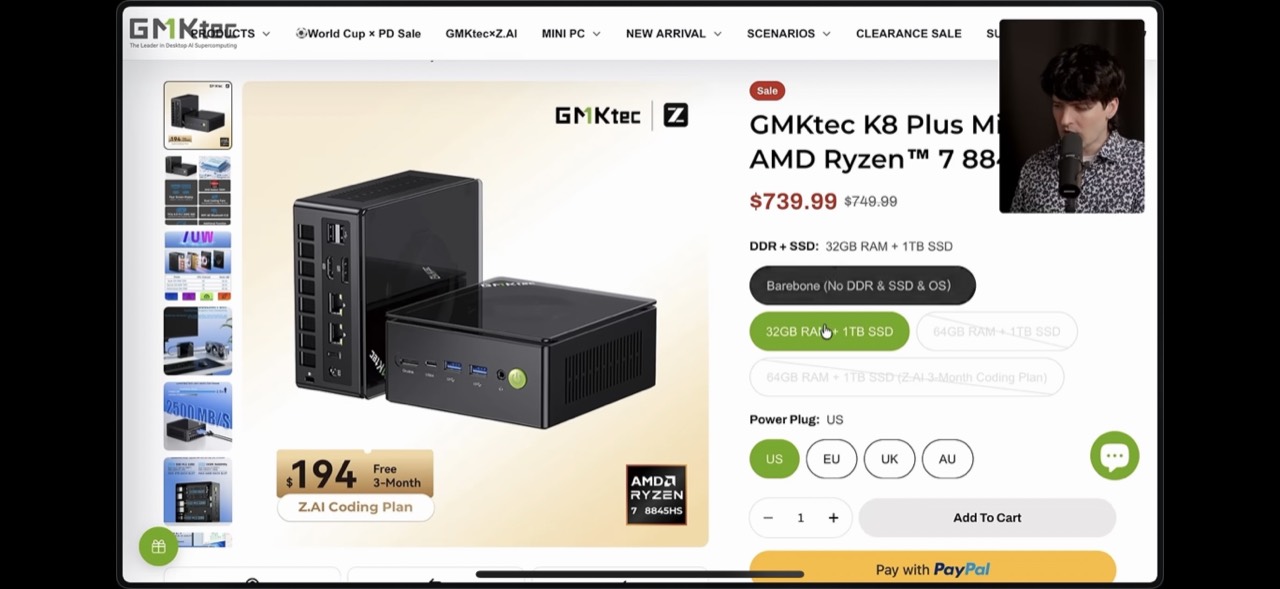
It's using jack [ __ ] And that project it's auditing isn't using PNPM or bun. It's using OG npm. So it's it's a hog and it's fine. This computer isn't breaking a sweat at all about this. And my most importantly though, my laptop isn't doing [ __ ] I still have codeex open, which hurts. But if I close that, it's not using jack [ __ ] for resources in comparison. It's so nice. It's so nice. But if you are looking for a computer to run this on, I'm going to ruin things for myself again here. The GMT K8 Plus is the computer I am using, the one that I showed here that I just set up with the KVM. more than enough computer for this type of stuff. Without RAM or an SSD, it's only 400 bucks with with 32 gigs of RAM and a 1 TB SSD is currently on sale for 740. And that $300 jump for 32 gigs of RAM and a terabyte drive is actually a pretty damn good deal because buying those separately would cost even more. So, if you're looking for a rig, this one's probably going to sell out fast. Worth considering. I don't get any affiliate deals when you buy from GMK Tech. I'm not even going to link it. Just go find it. It's a good deal. It's what I grabbed. It's been really nice. But honestly, you can probably run this in a cloud machine without too many issues. I would be careful using your O with things like codeex and more importantly cloud code in a cloud box because Anthropic does not want you running your personal cloud code sub anywhere but your personal hardware. So running it on your actual local network on your normal internet less likely to cause a ban. So personally, I'm not using any cloud boxes anymore. I did for a bit, but it isn't actually that hard to roll your own cloud. And you get significantly better utilization, significantly better performance, and way more control if you just get an old laptop or desktop or buy some small nuck throw on your network.
00:34:14
You can do a lot. I never thought I would be the guy writing all their code in Linux, but here we are. Especially with my synchronized T-M setup where all of them are colorcoded for the different machine and I have clicking on these working to switch between the different things going on. any one of the boxes. And when I have a new machine I want to set up, I just tell my agent to do it and it does it. It's so good. I have never been this happy with my development experience. There's a lot to wrangle. Like I've never had to think so much about what computer should run this workload, how do I get it to this machine later? But that orchestration is actually kind of fun. And I think orchestration is more and more our job as we're creating these agents and environments to work on the actual code for the products we're building. Controlling where and how they all run is more and more our job. And this has been an incredibly fun way to do it. And I hope I've inspired you to possibly go do it yourself. So, if you're tired of your laptop's fans spinning up for no good reason, and you want your performance to look like this while you're running a bunch of sub aents, I can't recommend this workflow highly enough. I am so much happier. I've been building way more. I've been taking significantly more advantage of the capabilities of these AI systems and agents, and I've finally been getting close to hitting my usage limits on both my codecs and cloud subs, and I credit the setup for it. And one last small thing for those of us who have set up Linux in the past and are annoyed by it or have decided that they don't think it's worth the effort. It's not that much effort when you tell Codeex to do it. It's insane how it's fun Linux is when you can open up a terminal, open up Claude Code or Codeex and tell it to configure the machine the way that you want it configured. I have had a number of people ask about using things like the Codeex cloud product or the Claude Code cloud product. You guys know, you guys know I'm a SIM for Codeex. The cloud stuff just doesn't [ __ ] work good. It's just not really there at all.
00:35:58
It's too hard to set up your environment. It's missing way too many different things to get that in a way that's actually viable. Accessing the code that it wrote to test things out or try things isn't great. You can't ask it to use the other model. Like I'll often tell Codex, go run claude-p to see what the results are from that to compare and contrast. Can't do any of that. You get way less control. you're super locked in. It's way worse and more broken. So much so that they've been hiding it. It used to be very accessible in the mobile app. I know that because my CTO Mark used to use it all the time. They made it harder to get to in the app because they're even pushing you to use the built-in remote stuff that exists in Codeex and now also in Cloud Code with the remote control option. It turns out it's really hard to build a generic host for any agent in any workflow for any project anyone is building. Cursor and Devon got a hell of a lot closer because they're much more focused on this. Codeex is nowhere near it. I I tried using these cloud things before and couldn't really make the jump, especially with Devon and Cursor as generous and awesome as they are not having the subsidized tokens hurt. This workflow has been much more pleasant for me and it's actually really fun to own and control. And coming very, very soon, the T3 Code mobile app that lets you control your computers and your agents fully remotely. It is hard to put into words just how excited I am to get this out. And hypothetically speaking, the whole project's open source. And if you did want to go build it and run it on your phone yourself, you probably could. Just saying. didn't want to make this video too big a self plug because I think the Linux box part is much more valuable and a lot of how we're building T3 code is based around how much we're loving this workflow now and in the end we all have the same enemy which is holding your laptop open when things are running and don't you dare tell me amphetamine is the solution you should know why that is wrong I got nothing else on this one I've been loving Linux I never thought I would be a dev working in this type of fashion but it is really really nice I highly recommend you give it a shot yourself. I bet you'll be surprised. Let me know what you guys think.